

Download Suitcase – Professional Font Manager for Designers
Overview
When a designer talks about the perfect layout, the conversation quickly turns to typography. A well‑chosen typeface can turn a simple mock‑up into a brand‑defining masterpiece, while a mismatched font can undermine hours of creative work. Suitcase Fusion 2 understands that stakes and delivers a specialized, secure, and highly responsive font‑management environment built for design professionals who work across Adobe Creative Cloud, QuarkXPress, and native Mac applications. Unlike generic font utilities, Suitcase centralizes every typeface in a protected database, eliminating the chaos of scattered font folders and the risk of duplicate or corrupted files.
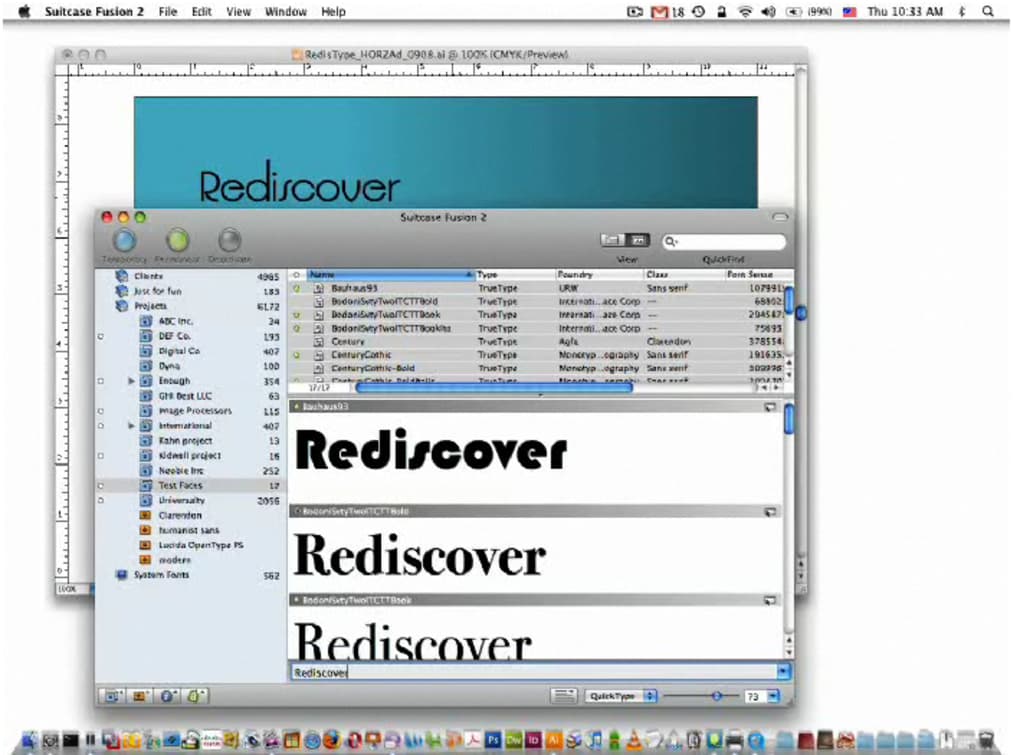
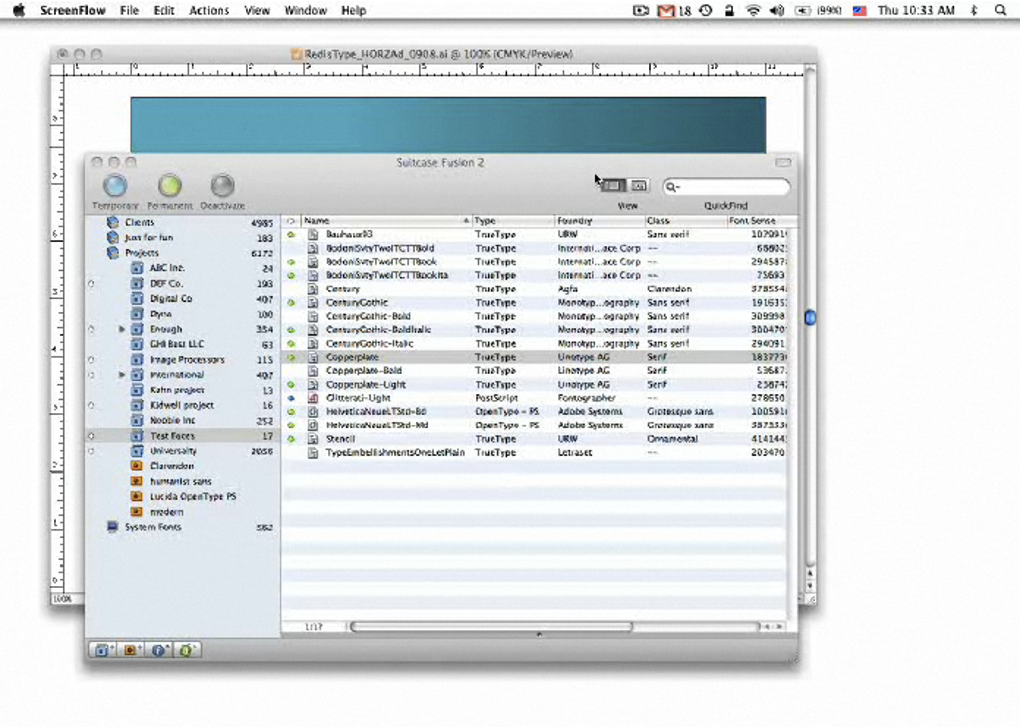
The core philosophy behind Suitcase is “font on demand.” By leveraging the proprietary Font Sense technology, the software automatically fingerprints the exact typefaces referenced in an InDesign, Illustrator, or QuarkXPress document and activates them in real time. This means you never have to manually browse through endless menus to locate a specific weight or style – the correct font appears the moment the document is opened. The interface is clean yet powerful: fonts are visualized in “suitcases,” family trees, or custom groups, allowing you to drag, drop, and nest sets in a way that mirrors the creative workflow rather than forcing you to adapt to the software.
Beyond activation, Suitcase includes a suite of professional tools: an interactive glyph preview that shows how each character renders at different sizes, a Font Doctor that scans and repairs corrupted fonts, and a Font Vault for archiving legacy typefaces without cluttering the active library. Whether you are a freelance graphic designer juggling multiple client brand guides, a studio art director managing a team’s shared font resources, or a UI/UX specialist who needs instant access to web‑safe and variable fonts, Suitcase Fusion 2 offers a level of control and confidence that few alternatives can match.
Key Features of Suitcase Fusion 2
- Dynamic Font Activation (Font Sense) – Automatic fingerprinting and activation of fonts used in InDesign, Illustrator, QuarkXPress, and even Microsoft Word files.
- Interactive Glyph Preview – Real‑time rendering of individual glyphs at any size, weight, or style, helping you evaluate legibility before committing.
- Drag‑and‑Drop Suitcases – Organize fonts into visual “suitcases,” nested sets, or custom groups that can be easily moved between projects.
- Font Vault & Archive – Securely store older or rarely used typefaces without inflating the active database.
- Font Doctor – Scan for missing outlines, duplicate entries, and corrupted files; automatically repair or replace problem fonts.
- Cross‑Application Compatibility – Fonts activated in Suitcase are instantly available to any open application, reducing the need for repeated activation steps.
- Multi‑Platform Support – Native macOS version with full integration into macOS font management APIs; also offers a Windows companion for mixed‑environment studios.
- Batch Conversion Tools – Convert Mac‑only OpenType fonts to Windows‑compatible formats without losing OpenType features.
- Secure Database – All fonts are stored in an encrypted library, protecting against accidental deletion and ensuring version control.
- Regular Updates & Cloud Sync – Automatic updates keep the font database current, and cloud sync lets teams share suitcases across multiple machines.
Installation, Usage & Compatibility
Getting Suitcase Fusion 2 up and running is intentionally straightforward, reflecting the developer’s respect for a designer’s time. After purchasing the license, you receive a secure download link for the installer. The macOS installer is a standard .dmg package; simply double‑click, drag the Suitcase icon into the Applications folder, and launch. Windows users receive an .exe installer that follows the typical “Next‑Next‑Finish” wizard, automatically detecting existing font directories and offering to migrate them into the Suitcase database.
During the first launch, Suitcase prompts you to create a master library. You can either import all fonts from your system’s default folders or select specific directories. The software then scans each file, generating a unique fingerprint that powers Font Sense. This process may take a few minutes for large collections, but it runs in the background, allowing you to continue working.
Once the library is built, using Suitcase is a matter of opening the app, selecting the desired suitcase or group, and dragging it onto the open document window. For Adobe Creative Cloud users, a plug‑in appears in the “Window > Extensions” menu, offering a live preview of active fonts and quick toggle switches. The integration works seamlessly with InDesign CS6 and newer, Illustrator CC, and QuarkXPress 2022 onward. For designers who rely on non‑Adobe tools—such as Sketch, Figma, or Microsoft Office—Suitcase still activates the fonts at the OS level, making them instantly selectable in any application.
Operating System Compatibility (itemprop="operatingSystem"): Suitcase Fusion 2 supports macOS 11 (Big Sur) through macOS 15 (Ventura) and Windows 10, 11 (both 64‑bit). The software leverages Apple’s Core Text API for lightning‑fast rendering on Mac, while on Windows it utilizes the DirectWrite engine. Minimum hardware requirements are modest: 4 GB RAM, 200 MB of free disk space for the application itself, and additional space proportional to your font collection (approximately 1 MB per 100 fonts).
For teams, the “License Management” portal lets you allocate seats, revoke access, and monitor usage across multiple machines. The cloud sync feature stores a compressed copy of your suitcases on a secure server, enabling you to pull the same library onto a new workstation with a single click—ideal for freelancers who switch between a MacBook Pro and a Windows desktop.
Pros, Cons & Frequently Asked Questions
Pros
- Instant font activation via Font Sense eliminates manual searching.
- Powerful organization tools (suitcases, nested groups, vault) keep large libraries tidy.
- Font Doctor quickly resolves corrupted or duplicate fonts, saving troubleshooting time.
- Cross‑application compatibility ensures fonts are available in any design software.
- Secure, encrypted database protects against accidental loss and version conflicts.
Cons
- Higher price point compared to basic font managers; may be steep for hobbyists.
- Windows version lacks some macOS‑specific UI polish.
- Initial library scan can be time‑consuming for massive collections (100,000+ fonts).
- No native mobile app; designers must rely on desktop environments.
- Advanced features like Font Sense require a learning curve for new users.
FAQ (itemtype="https://schema.org/FAQPage")
-
Can Suitcase manage variable fonts?
Yes. Suitcase Fusion 2 fully supports OpenType variable fonts, allowing you to adjust weight, width, and optical size sliders directly within the preview pane.
-
Is there a trial version available?
A 14‑day free trial can be downloaded from the official website. The trial includes all premium features but limits the number of active suitcases to three.
-
How does Font Doctor repair corrupted fonts?
Font Doctor scans each glyph for missing outlines, inconsistent metrics, and duplicate tables. It then rebuilds the affected tables or replaces corrupt data with a clean copy, preserving original kerning and OpenType features whenever possible.
-
Can I share a suitcase with a client who doesn’t have Suitcase?
Clients can receive a packaged suitcase file (.suitcase) and open it with the free Suitcase Viewer, which allows read‑only access to the font list and previews.
-
Does Suitcase impact system performance?
Because fonts are stored in a centralized, indexed database, Suitcase actually reduces system load compared to having hundreds of loose font folders. The background scanning process uses minimal CPU and can be paused.
Conclusion & Call to Action
For design professionals who treat typography as a strategic asset rather than a decorative afterthought, Suitcase Fusion 2 offers a comprehensive, secure, and future‑proof solution. Its intelligent activation engine, robust organization tools, and built‑in repair utilities eliminate the friction that traditionally accompanies large font collections. While the price tag may deter casual users, the time saved on troubleshooting, the confidence of knowing every glyph is intact, and the ability to collaborate across macOS and Windows environments make it a worthwhile investment for agencies, studios, and freelancers alike.
If you’re ready to bring order to your type library and empower your creative workflow, download Suitcase Fusion 2 today. Take advantage of the 14‑day free trial to explore every feature before committing. A well‑managed font collection is the silent partner behind every successful design—let Suitcase be that partner.







